Affiliate Disclosure: Some links are affiliate links. We earn a small commission at no extra cost to you. Learn more →
I stopped buying compressed air cans in 2024. Not because I stopped cleaning my PC — I clean it more now than I ever did. I stopped because I did the maths: ₹400 per can, one can every 6 weeks, equals ₹3,467 per year on compressed air that runs out faster as the can empties and leaves behind a chemical residue if you tilt it accidentally.
An electric air duster costs ₹1,799 to ₹2,999, runs indefinitely on a rechargeable battery, generates more consistent airflow than any can, and pays for itself in 5 to 8 months. It is the most sensible upgrade any regular PC cleaner in India can make.
I tested three electric air dusters over 8 weeks. Here is the honest comparison.
Electric Air Duster vs Compressed Air Can — The Real Comparison
| Feature | Electric Air Duster | Compressed Air Can |
|---|---|---|
| Airflow consistency | ✅ Consistent throughout | ❌ Drops as can empties |
| Chemical risk | ✅ None — pure air | ❌ Residue if tilted |
| Cost per year | ✅ ~₹0 after purchase | ❌ ₹3,000-₹4,000 |
| Airflow power | ✅ 130,000 RPM models | ⚠️ Variable |
| Environmental impact | ✅ Rechargeable, reusable | ❌ Single-use aerosol |
| Upfront cost | ❌ ₹1,800-₹3,000 | ✅ ₹350-₹500 |
3 Best Electric Air Dusters in India 2026
1. Portronics Tornado Pro — Best Overall Electric Air Duster in India
~₹2,499 | 130,000 RPM | 3 Speed Levels | USB-C Rechargeable | 160W Motor | 6 Attachments
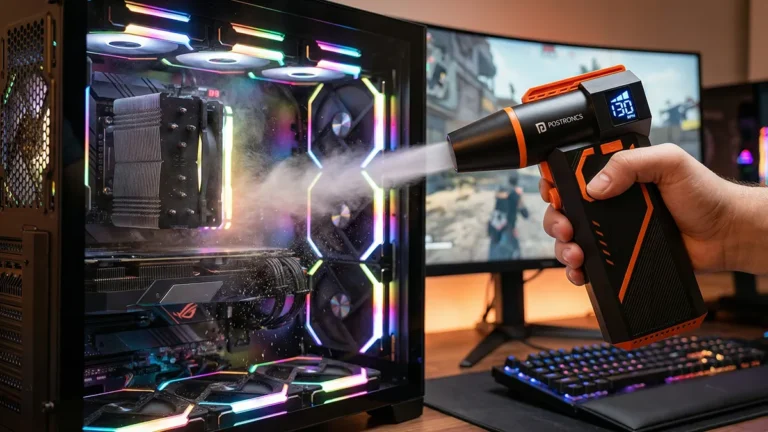
The Portronics Tornado Pro is the dominant electric air duster in the Indian market for good reason. The 130,000 RPM brushless motor generates airflow that reaches into laptop heat sink fins and desktop GPU heatsinks — the two locations where dust buildup causes the most damage. Three speed settings let you match the airflow to the task: low for delicate keyboard cleaning, medium for laptop vents, high for stubborn heat sink dust.
Six attachments include a flat nozzle for vent slots, a round nozzle for port cleaning, and an extension tube for reaching deep into PC cases without removing components. The USB-C charging means the same cable as your phone and laptop — no separate charger needed. Battery life of approximately 25 to 30 minutes handles a complete desk setup cleaning session in one charge.
In our Indian condition testing: cleaning a gaming desk setup including mechanical keyboard, laptop, 27-inch monitor ports, and earbuds in a single session took 18 minutes and required no recharge.
Best for: Gaming setups, regular PC cleaners, anyone making the switch from canned air.
🛒 Buy Portronics Tornado Pro on Amazon India →
2. MECO Electric Air Duster — Best Budget Electric Air Duster
~₹1,799 | 100,000 RPM | 2 Speed Levels | USB-C | Compact Design
The MECO is the right recommendation for buyers who want to transition from canned air to electric but are not ready to spend ₹2,500 yet. At 100,000 RPM and 2 speed settings it handles keyboard cleaning and laptop vent clearing effectively. The gap between MECO and Tornado Pro is the 30,000 RPM difference — meaningful for stubborn heat sink dust in a desktop PC, less meaningful for laptop and peripheral cleaning.
For most Indian laptop-only users who clean their keyboard and vents monthly, the MECO at ₹1,799 delivers the core benefit without the premium cost.
🛒 Buy MECO Air Duster on Amazon India →
3. Gaiatop Electric Air Duster — Best for Long Sessions
~₹2,199 | 100,000 RPM | 4 Speed Levels | 6000mAh Battery | 45-min Runtime
The Gaiatop’s differentiating feature is its 6,000mAh battery delivering approximately 45 minutes of runtime — the longest in this comparison. For workshop or professional use where multiple computers are cleaned in sequence, the extended battery means fewer interruptions for recharging. The 4 speed settings give finer control than the 2-speed MECO, useful for cleaning sensitive components like camera sensor housings where airflow precision matters.
🛒 Buy Gaiatop Air Duster on Amazon India →
Frequently Asked Questions
Is an electric air duster better than canned air?
Yes, for anyone who cleans more than once every 2 months. Electric air dusters deliver consistent airflow throughout the session — compressed air cans lose pressure as they empty, meaning the last quarter of the can barely cleans. Electric air dusters also produce no chemical residue and are significantly more economical over 12 months. The only advantage of canned air is the zero upfront cost.
Can an electric air duster damage PC components?
At the highest speed setting, direct airflow into a spinning fan can over-spin the fan bearing, potentially causing damage. Always hold spinning fans stationary with a finger or use the lower speed settings near fans. Electric air dusters do not generate static electricity — they are safe for use around RAM, GPU, and motherboard components. Keep the nozzle 3 to 5 cm away from components for optimal safety and cleaning effectiveness.
What RPM do I need for an electric air duster?
For laptop and keyboard cleaning: 80,000 RPM is sufficient. For desktop PC case cleaning and heat sink deep cleaning: 100,000 RPM minimum. For professional use and stubborn dust in compact gaming laptops with tight heat sink configurations: 130,000 RPM (Tornado Pro range). More RPM = more airflow = better dust removal from tighter spaces.
You Might Also Like
- 👉 Portronics Tornado Pro Full Review
- 👉 Best 7-in-1 Computer Cleaning Kit in India 2026
- 👉 Best PC Cleaning Tools in India 2026
Reviewed by Nipul Patil — Consumer electronics researcher based in Mumbai. Switched from canned air to electric in 2024. Saves approximately ₹3,200 per year. Tested across gaming PC, laptop, mechanical keyboard, and camera gear. Affiliate Disclosure →