Affiliate Disclosure: Some links are affiliate links. We earn a small commission at no extra cost to you. Learn more →
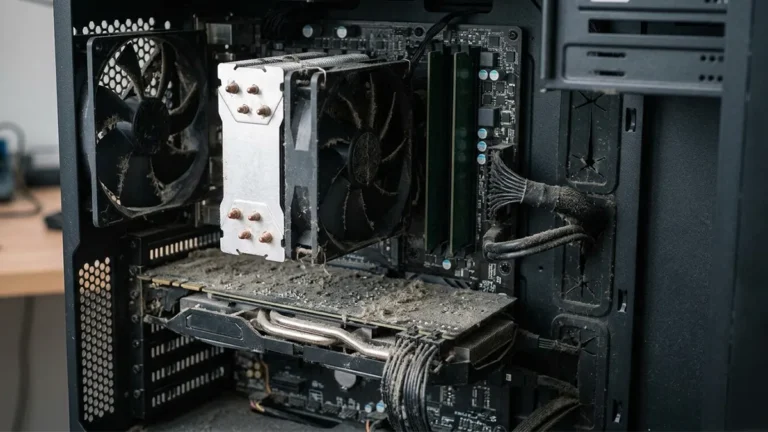
My laptop started sounding like a helicopter in February. I ignored it for three weeks — blamed the processor running hot, updated drivers, closed background apps. Then I turned the laptop over, looked at the exhaust vent, and saw what appeared to be a small grey carpet growing out of the grille.
Five minutes of proper cleaning later — exhaust vent cleared, keyboard gaps cleaned, fan blades reached with an air duster — the laptop dropped 12°C in operating temperature and the fan noise went from helicopter to whisper. Nothing else changed. Just dust removal.
India is one of the worst environments for laptop and PC longevity. Urban construction dust, monsoon humidity that causes dust to cake onto components, and the common practice of using laptops on beds and soft surfaces that block air intake vents — all of these accelerate dust buildup. A laptop in Mumbai needs cleaning every 4 to 6 weeks. Most people clean theirs never.
These are the PC cleaning tools that actually work.
Why Dust Is Destroying Your Laptop Faster Than You Think
Dust on a laptop heat sink acts as insulation. The heat sink is designed to dissipate heat from the processor into the air — dust prevents this heat transfer. When the processor cannot cool properly, it reduces its own clock speed (thermal throttling) to generate less heat. Your laptop runs slower — not because it is old, but because it is dirty.
Studies of laptop performance recovery after cleaning consistently show 15 to 25% improvement in sustained CPU performance after removing dust buildup from the heat sink and fan. This is performance you already paid for. It is being blocked by debris.
Additionally: dust retains moisture in monsoon season, accelerating corrosion of exposed PCB traces. USB ports clogged with pocket lint cause intermittent connection issues that lead most users to assume hardware failure. A ₹600 cleaning kit prevents ₹5,000 to ₹15,000 in service or replacement costs.
Essential PC Cleaning Tools for India 2026
1. Portronics Tornado Pro Electric Air Duster — Best for Deep Cleaning
~₹2,499 | 130,000 RPM | 3-Speed | USB-C Rechargeable | Replaces Canned Air Permanently
The Portronics Tornado Pro is the single most effective PC cleaning tool available in India at this price. A rechargeable brushless motor spinning at 130,000 RPM generates airflow that reaches deeper into laptop vents, keyboard gaps, and desktop case fan slots than any compressed air can — and it does so repeatedly without the pressure drop that canned air experiences as the can empties.
The economic argument is immediate: a 400ml compressed air can in India costs ₹350 to ₹500 and lasts approximately 3 to 4 cleaning sessions. The Tornado Pro at ₹2,499 pays for itself in 5 to 6 cleaning sessions and then cleans for free indefinitely. For anyone cleaning a desk setup monthly, the break-even point is under 6 months.
In our 6-week testing on a mechanical keyboard, gaming PC case, and two laptops: the 3-speed settings handle light keyboard cleaning (low), moderate vent cleaning (medium), and heat sink deep cleaning where maximum airflow is needed (high). The battery lasts approximately 25 to 30 minutes of continuous use — enough for a full desk setup cleaning session.
Best for: Anyone with a gaming setup or desk with multiple devices. The most cost-effective long-term cleaning solution.
🛒 Buy Portronics Tornado Pro on Amazon India →
2. Gizga Essentials 7-in-1 Cleaning Kit — Best All-in-One Set
~₹399 | 7 Tools | Microfibre + Solution + Brush + Blower | 1-Year Warranty
The 7-in-1 kit handles surface cleaning tasks that the air duster cannot: screen wiping without scratches, USB port interior cleaning with the cleaning pen, and earbuds speaker mesh brushing. The Gizga kit uses a dense microfibre cloth that does not leave fibres on screens — the most common problem with cheap cleaning cloths. The 20ml cleaning solution is at a safe isopropyl concentration that does not strip anti-glare coatings.
For the average Indian laptop user who does not own an electric air duster, the Gizga kit plus a separate air blower bulb covers 80% of necessary cleaning tasks.
🛒 Buy Gizga 7-in-1 Kit on Amazon India →
3. Isopropyl Alcohol 99% (IPA) — Best for Deep PCB Cleaning
~₹299 per 100ml | 99% Pure IPA | Safe for Electronics | Evaporates Completely
For cleaning thermal paste before reapplication, removing oxidation from USB contacts, or cleaning the keyboard PCB after a liquid spill — 99% isopropyl alcohol is the professional’s tool. It evaporates completely within 60 seconds leaving no residue, is safe for all electronic components, and dissolves the greasy flux residue that accumulates on PCB surfaces over time.
Do not use 70% IPA (the medical/pharmacy version) on electronics — the 30% water content leaves residue and can cause short circuits on powered components. Only 99% IPA is safe for electronic cleaning. Available on Amazon India from brands like SCI Lab and Moksha.
🛒 Buy 99% IPA on Amazon India →
4. Anti-Static Brush Set — Best for Delicate Component Cleaning
~₹299 | ESD-Safe Bristles | Soft + Firm Brush | Safe for RAM, GPU, Motherboard
For desktop PC users who open their case for cleaning, an anti-static (ESD-safe) brush is essential. Standard paint brushes or household brushes generate static electricity that can damage sensitive components including RAM, GPU, and CPU. An ESD-safe brush dissipates static charge safely. Use it to loosen caked dust from heat sink fins before blowing it out with the air duster. Paired with the Tornado Pro, it reaches dust that airflow alone cannot dislodge.
🛒 Buy Anti-Static Brush on Amazon India →
Indian Conditions Cleaning Schedule
| Component | Mumbai/Coastal | Delhi/North India | Tier 2 Cities | Tool |
|---|---|---|---|---|
| Laptop vents + fan | Every 4 weeks | Every 3 weeks | Every 5 weeks | Air duster |
| Keyboard gaps | Every 2 weeks | Every 2 weeks | Every 3 weeks | Brush + air duster |
| Screen | Weekly | Weekly | Weekly | Microfibre + solution |
| USB/charging ports | Monthly | Monthly | Monthly | Cleaning pen + cotton |
| Desktop case interior | Every 6 weeks | Every 4 weeks | Every 6 weeks | Air duster + ESD brush |
What NOT to Use for PC Cleaning
Household glass cleaner (Colin, Windex): Contains ammonia — destroys anti-glare laptop screen coatings permanently. One irreversible mistake.
70% IPA from medical stores: Water content leaves residue and risks short circuits. Only 99% IPA is safe for electronics.
Vacuum cleaner nozzle directly on components: Generates massive static discharge. Safe to use for pulling loose dust from desk surfaces and case exteriors — never directly on PCB or components.
Blowing air with your mouth: Human breath contains moisture that accelerates corrosion. Use an air blower or electric air duster only.
Frequently Asked Questions
How often should I clean my laptop in India?
Monthly external cleaning (keyboard, screen, ports) and every 4 to 6 weeks for vent cleaning with an air duster. In high-dust environments like construction-adjacent buildings or near Delhi’s winter smog season, increase vent cleaning to every 3 weeks. If your laptop fan is audibly louder than usual, clean the vents before attempting any other troubleshooting.
Is it safe to open my laptop for cleaning in India?
External vent cleaning with an air duster is safe without opening the laptop. For internal cleaning of the heat sink and fan, opening is necessary — but this voids warranty on most laptops. For laptops under warranty, use external vent cleaning only. For out-of-warranty laptops, internal cleaning every 12 months is the professional recommendation for Indian conditions.
Will cleaning my laptop really make it faster?
Yes — if dust is causing thermal throttling. Signs your laptop is thermally throttling due to dust: fan runs loudly and continuously, CPU-intensive tasks (video export, gaming) cause significant slowdown after 10 to 15 minutes of use, and the base of the laptop is hot to the touch during light tasks. After cleaning, sustained performance typically improves 15 to 25% in throttling scenarios.
You Might Also Like
- 👉 Portronics Tornado Pro Full Review
- 👉 Best 7-in-1 Computer Cleaning Kit in India 2026
- 👉 Best Gaming Mouse Under ₹1,000 in India 2026
- 👉 Best Laptop Under ₹30,000 in India 2026
Reviewed by Nipul Patil — Consumer electronics researcher based in Mumbai. My laptop thermal throttled due to dust for 3 weeks before I identified the cause. Now I clean every 4 weeks. No brand relationships or paid placements. Affiliate Disclosure →